House Warming
In my previous post, I explained why I build software in Eastland, Texas. Part of that is it's where I'm from in a very fundamental sense. And, where I come from, we celebrate accomplishments. Often by throwing a party (queue Oz's explanation of parties). In this case, that's a little harder, but you can raise a bowl of banana pudding for us, if you want. Yes, Digital Prairie Enterprises has met a milestone.
PromptMe Closed Beta
PromptMe is first real test of the idea that rural communities can compete in the information economy, and I'm proud to announce that it has hit the first major milestone: it is in closed beta. You can hit promptme.digitalprairieenterprises.com and sign in with Google or your email address and a password. Click a button, paste a script, and you're off to the races - a voice tracking teleprompter with no app to install, no foot pedal, operator, or scrolling speed selector. Just your words tracked as you speak and aligned with your text.
That's the idea, anyway. Here's where we stand.
What it does
The problem PromptMe solves is a very specific one. Every speaker or presenter is used to the problem. The more you improvise off your script, the harder it is to make sure you've hit everything. The more you rely on your script, the less present you are with your audience. Teleprompters solve that problem for politicians and high-bankroll types, but even they have a problem - they don't scroll on their own. Or, they do scroll on their own, but at a set speed and you sort of have to guess at how fast you are going to talk. For the rest of us, paper notes - or even notes on a tablet or phone - mean we have to look down and its easy to lose your place.
PromptMe solves this by listening to you through your microphone highlighting your exact position in the script in real-time. Line by line, word by word, it follows when you speak. When you pause, the scroll pauses. When you speak, it resumes right where you were.
It runs in any modern browser. On Android and iOS, you can install it to your home screen for a full-screen experience.
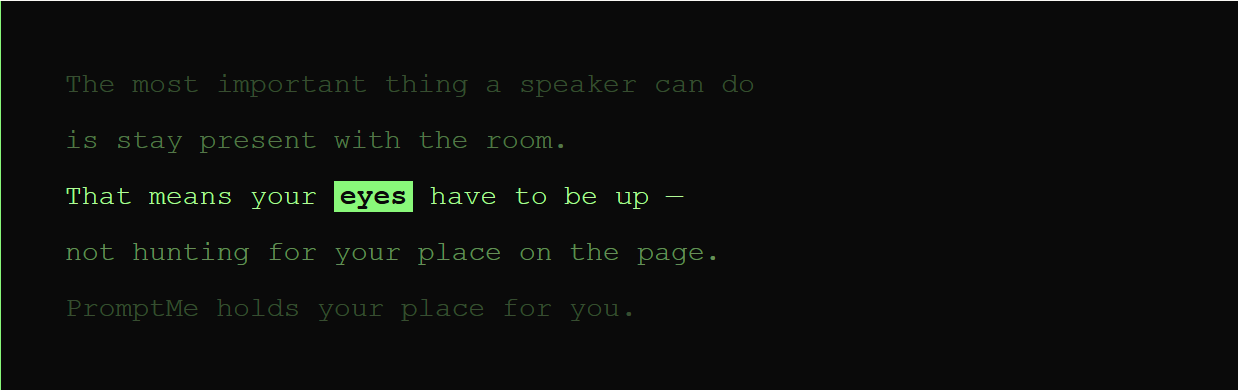
At least... that's the theory.
The current state is somewhat more nuanced.
What's working well
The core loop works. Sign in, create a script, click into Prompter Mode, hit start, start talking. Five steps from zero to presenting with authority. Pause and resume detection work. When you stop, the scrolling stops. When you start, it starts. The clean terminal-like interface works. Nothing competes with your words.
Scripts save and sync across devices. As long as you use the same login, your scripts are available. Write on your laptop, then prompt from your phone or tablet. Free tier gives you five scripts and full speech tracking. There's no trial period, no watermark, no "upgrade to unlock" the feature you're really looking for. Because companies that do that are The Worst(TM).
That speech tracking is fairly basic. It is the free tier, and that requires some limitations. I'm not made of money. Yet.
Enhanced speech tracking is on the Pro tier. That is currently available to a select number of users, but it makes a real difference. Free tier uses on-device processing and a static language model. That means it is going to trail your voice by up to a few seconds, and it really struggles with repeated phrases and proper nouns (not that anyone outside of Texas knows how to pronounce Mexia anyway). The Pro tier brings that lag to sub-second, and is much better about obscure words or proper nouns.
Free tier gives you five scripts and full speech tracking. There's no trial period, no watermark, no "upgrade to unlock" the feature you're really looking for. Because companies that do that are The Worst(TM)
What isn't working... yet
I'm dedicated to honesty and clarity, so here's the list of what isn't verified, is buggy, or is known not to work yet. If you're going to use it, you should know what to expect.
- Free tier tracking lag. I mentioned this earlier, but it's important to know that the free tier is kind of laggy. One to two seconds - sometimes more, but not often, is a lot when you're trying to give a presentation. This is especially noticeable on fast sections. The Pro tier pretty well fixes this.
- Short lines track better than long. Aim for about six to twelve words - and only one thought - per line. If you paste a wall of text, you'll get poor tracking. Breaking up the script into smaller lines takes a fair amount of work - I know. It is, however, worth it when you're trying to give your presentation.
- Parallel phrases are... tricky. So are proper nouns or obscure words, especially on the free tier. The fact is there are limits to what the computer can do - it can't actually read your mind yet - so it has to evaluate what was picked up by your microphone and parsed against your tokenized speech. For some presentations, this is fine, and you'll never notice. For others, especially those with repeated phrases, it can cause problems. The closer together the repetition, the worse it is. This known issue is on the roadmap.
- Background noise affects accuracy. Background TV, traffic, other people speaking, the air conditioning vent being three feet from your microphone... these can all degrade accuracy. A good microphone with white noise squelching helps. So does a quiet room.
- iOS is untested. I haven't tested PromptMe on iPhone or iPad. Safari's audio handling is very different from Chrome, and I anticipate issues. I would love for someone to try iOS and let me know exactly how broken it is. Your feedback would shape iOS support going forward.
None of these should be dealbreakers for the product. This is just the honest state of the beta. I'm being transparent and honest because I've made a commitment to do those things and because if you're willing to beta test and give me feedback, you deserve to know what's what.
What's in it for me?
I'm asking for beta testers to use PromptMe for real content. A real sermon. A real lecture. A real podcast episode. Not just a demo or a test script, but real usage. Play with it first, certainly, because if it's too broken for you, that's good feedback, too. But, assuming it's usable, the feedback that will actually help is from real usage. That's the only sort of feedback that will help me build something worth building.
The questions I care about most aren't "is it impressive" or "is the UI clean." I'm reasonably happy with both of those things, or you wouldn't be seeing it yet. No, I need these questions answered:
- Does it keep up with you well enough to really use? If it's just too slow or (less likely) jumps too far ahead, I need to know that.
- Does it lose your place - and, if yes, what were you saying and what did your script say? A good 12 lines of context will go a long way to help me troubleshoot any issues.
- When you stopped speaking deliberately, did the scroll stop? Did it start again when you started speaking again?
- Would you use it again the next time you stand up to speak? If not, why not. What does it need to do differently?
What's in it for you?
I'm not asking you to do this out of the goodness of your hearts. Okay, yes I am, but I also know that if you're going to help me, I should help you. For those who are accepted into the closed beta (there are limited slots), you will have free access to the Pro tier for the duration of the beta, and one year after full go-live. You'll also get to help shape the product as it moves forward.
What's coming
First up is the Pro tier. This sort-of exists today, but will be limited to those accepted into the closed beta. Once we go live, look for a price-point around $10/mo. Exact pricing isn't set, and I'm sure I'll have a pre-pay discount for people who sign up for longer terms. Current Pro tier is the better, more responsive speech model that tracks better, and unlimited scripts. Coming up before go-live will also be session metrics, filler word counter, and pacing notes.
After Pro is up, the roadmap includes a Premium tier. This will include everything in Pro, plus Script Feedback (AI analysis of your script before you speak) and Record and Coach (AI delivery analysis after a practice session - will require uploading a recording). The goal is to make everything about preparing and delivering your speech or presentation easier, all without having to consult a live coach.
An enhanced settings screen, iOS-tested build, and an offline mode for Pro and Premium users are all on the roadmap as well.
How to get in
PromptMe is available at promptme.digitalprairieenterprises.com Sign in with Google or create an account. The Free tier is open to anyone. If you are willing to provide beta feedback, email me at allen@digitalprairieenterprises.com and let me know how you speak - what you do, what you're hoping PromptMe will help with. I'll be in touch.